Mike's Workshop Manuals
: Service manuals for every vehicle
Home
>>
Toyota
>>
2017
>>
4Runner TRD Pro
>>
Repair and Diagnosis
>>
Brakes
>>
Traction Control
>>
Brake Control System - Service Information
>>
Crawl Switch
>>
Removal [08/2015 - ]
>>
Procedure
Removal [08/2015 - ]: Procedure
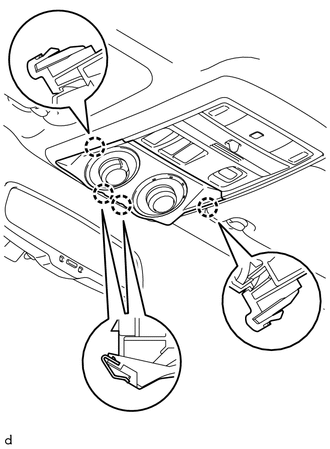
REMOVE DRIVE MONITOR SWITCH (CRAWL CONTROL SWITCH AND MULTI-TERRAIN SELECT SWITCH)
Detach the 4 claws and remove the drive monitor switch (CRAWL control switch and multi-terrain select switch) from the map light assembly.
Courtesy of © TOYOTA, LICENSE AGREEMENT TMS1002
Disconnect the connector.
 Courtesy of © TOYOTA, LICENSE AGREEMENT TMS1002