See "SELF-DIAG RESULTS" of all units attached to the check sheet. If "CAN COMM CIRCUIT", "CAN COMM CIRCUIT [U1000]" or "CAN COMM CIRCUIT [U1001]" is displayed, put a check mark to the applicable column of self-diagnostic results of the check sheet table.
NOTE:
- For "ENGINE", "CAN COMM CIRCUIT [U1001]" is displayed. Put a check mark to it.
- For "BCM", "NO DTC IS DETECTED" is displayed. Do not put a check mark to it.
- For "ABS", "NO DTC IS DETECTED" is displayed. Do not put a check mark to it.
- For "IPDM E/R", "CAN COMM CIRCUIT [U1000]" is displayed. Put a check mark to it.
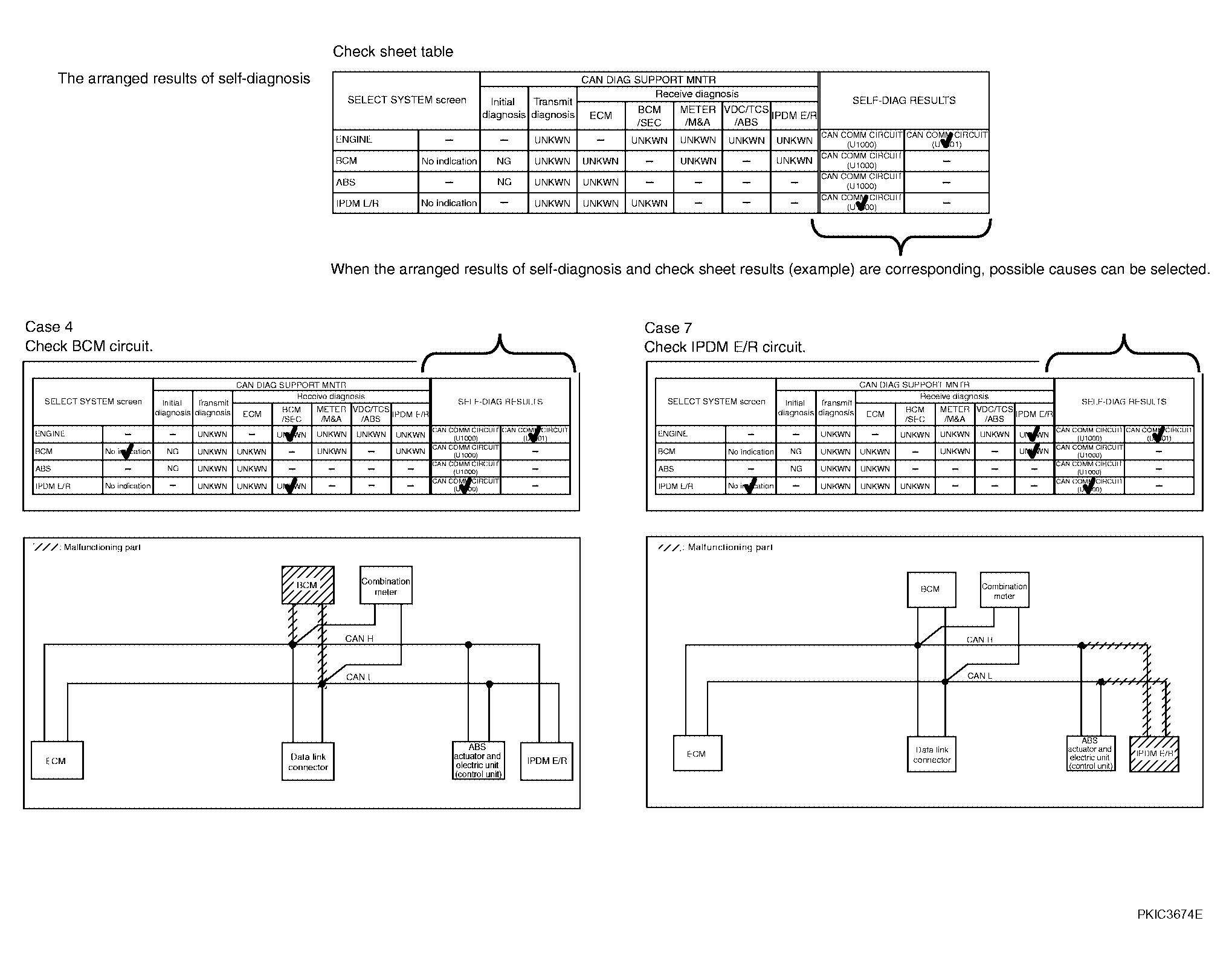 Courtesy of NISSAN MOTOR CO., U.S.A.
NOTE:
There is a case that some of "CAN DIAG SUPPORT MNTR" and "SELF-DIAG RESULTS" are not needed for diagnosis. In the case, "UNKWN" and "CAN COMM CIRCUIT [U1000]" in "Check sheet results (example)" change to "-". Then, ignore check marks on the check sheet table.