DSC/RSC HU Air Bleeding
- Turn the ignition switch off.
- Connect the M-MDS to the DLC-2 connector.
- After the vehicle is identified, select the following items from the initial screen of the M-MDS.
- When using the IDS (notebook PC)
- Select the "Toolbox" tab.
- Select "Chassis".
- Select "Braking".
- When using the PDS (pocket PC)
- Select "All Tests and Calibrations".
- Then, select the "ABS Service Bleed" from the screen menu.
- Perform the air bleeding according to the directions on the screen.
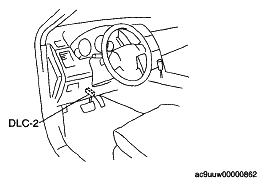 Courtesy of MAZDA MOTORS CORP.