Simulation Function Procedure
- Connect the M-MDS to the DLC-2.
- After the vehicle is identified, select the following items from the initial screen of the M-MDS.
- When using the IDS (notebook PC)
- Select the "Toolbox" tab.
- Select "DataLogger".
- Select "Module".
- Select "PCM".
- When using the PDS (pocket PC)
- Select "Module Tests".
- Select "PCM".
- Select "DataLogger".
- Select the simulation items from the PID table.
- Perform the simulation function, inspect the operations for each parts.
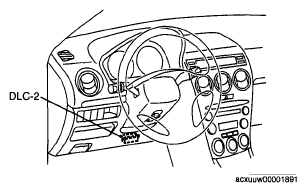 Courtesy of MAZDA MOTORS CORP.
- If there is no operation sound from the relay, motor, and solenoid after the simulation function inspection is performed, it is possible that there is an open or short circuit in the wiring harness, relay, motor or solenoid, or sticking and operation malfunction.