Variant Code Reset
- Make sure the condition of ECM/TCM/ESP (ESC) connected.
- Connect GDS to Data Link Connector (DLC).
- IG "ON", and then select the model, system (ESP (ESC)).
- Click the Vehicle S/W Management button (Fig.3).
- Using GDS, Perform Variant Code Reset. (Fig.4).
- IG "OFF" and wait for about 10 seconds, and then IG "ON".
- IG "OFF" and wait for about 10 seconds again, and then, IG "ON".
- Go to "COMPONENT INSPECTION " procedure.
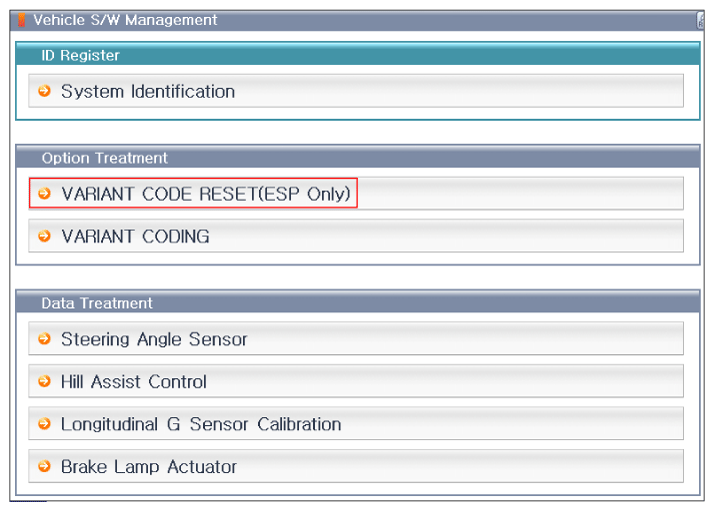 Courtesy of HYUNDAI MOTOR AMERICA
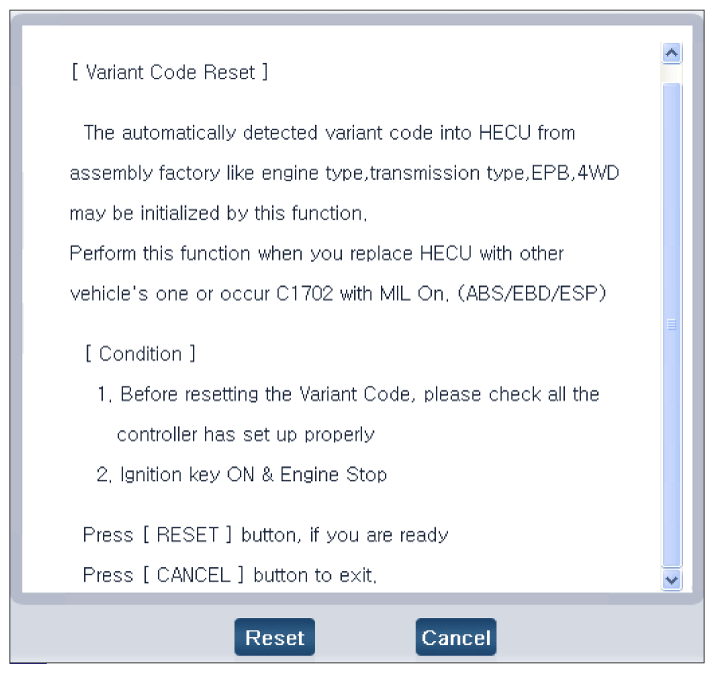 Courtesy of HYUNDAI MOTOR AMERICA