Dust and Pollen Filter Replacement
- Open the glove box. Remove the damper and the glove box stop on each side, then let the glove box hang down (see
DASHBOARD CENTER LOWER COVER DISASSEMBLY/REASSEMBLY
).
- Remove the dust and pollen filter assembly (A) from the blower unit.
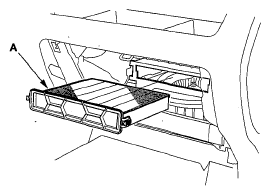 Courtesy of AMERICAN HONDA MOTOR CO., INC.
- Remove the filter (A) from the housing (B), and replace the filter.
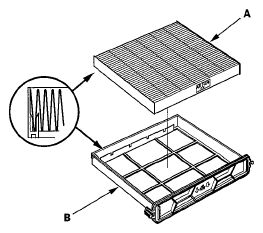 Courtesy of AMERICAN HONDA MOTOR CO., INC.
- Install the filter in the reverse order of removal. Make sure that there is no air leaking out of the blower unit.