CVT Output Shaft (Driven Pulley) Speed Sensor Replacement
- Remove the air cleaner (see
AIR CLEANER REMOVAL/INSTALLATION
).
- Disconnect the CVT output shaft (driven pulley) speed sensor connector, then remove the CVT output shaft (driven pulley) speed sensor (A).
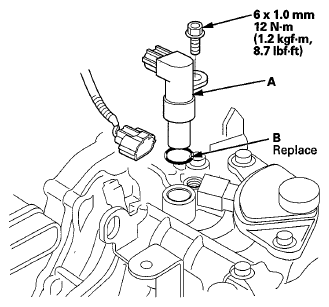 Courtesy of AMERICAN HONDA MOTOR CO., INC.
- Install a new O-ring (B) on a new CVT output shaft (driven pulley) speed sensor, then install the CVT output shaft (driven pulley) speed sensor in the transmission housing.
- Check the connector for rust, dirt, or oil, and clean or repair if necessary then connect the connector securely.
- Install the air cleaner (see
AIR CLEANER REMOVAL/INSTALLATION
).