2004-2006 Models
- Remove the lower valve body (see
LOWER VALVE BODY ASSEMBLY REPLACEMENT ).
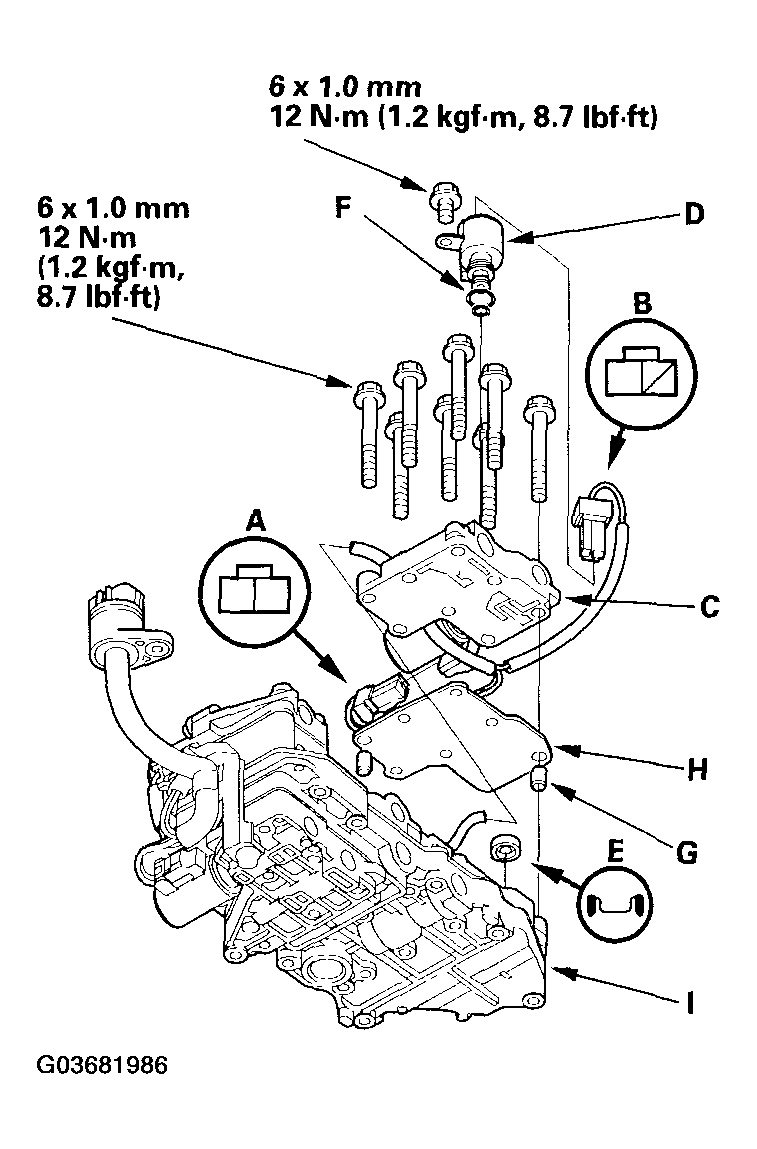
- Disconnect the CVT driven pulley pressure control valve connector (A) and the inhibitor solenoid connector (B).
 Courtesy of AMERICAN HONDA MOTOR CO., INC.
- Remove the CVT driven pulley pressure control valve (C), and remove the inhibitor solenoid (D) from the CVT driven pulley pressure control valve.
- Check that the filter (E) is in good condition, replace it if it is clogged or damaged.
- Replace the O-rings (F) on the inhibitor solenoid, if necessary.
- Install the inhibitor solenoid on the new CVT driven pulley pressure control valve.
- Install the new CVT driven pulley pressure control valve with the dowel pins (G) and separator plate (H) on the lower valve body (I).
- Connect the CVT driven pulley pressure control valve connector and the inhibitor solenoid connector.
- Install the lower valve body (see
LOWER VALVE BODY ASSEMBLY REPLACEMENT ).