2004-2006 Models
- Remove the lower valve body (see
LOWER VALVE BODY ASSEMBLY REPLACEMENT ).
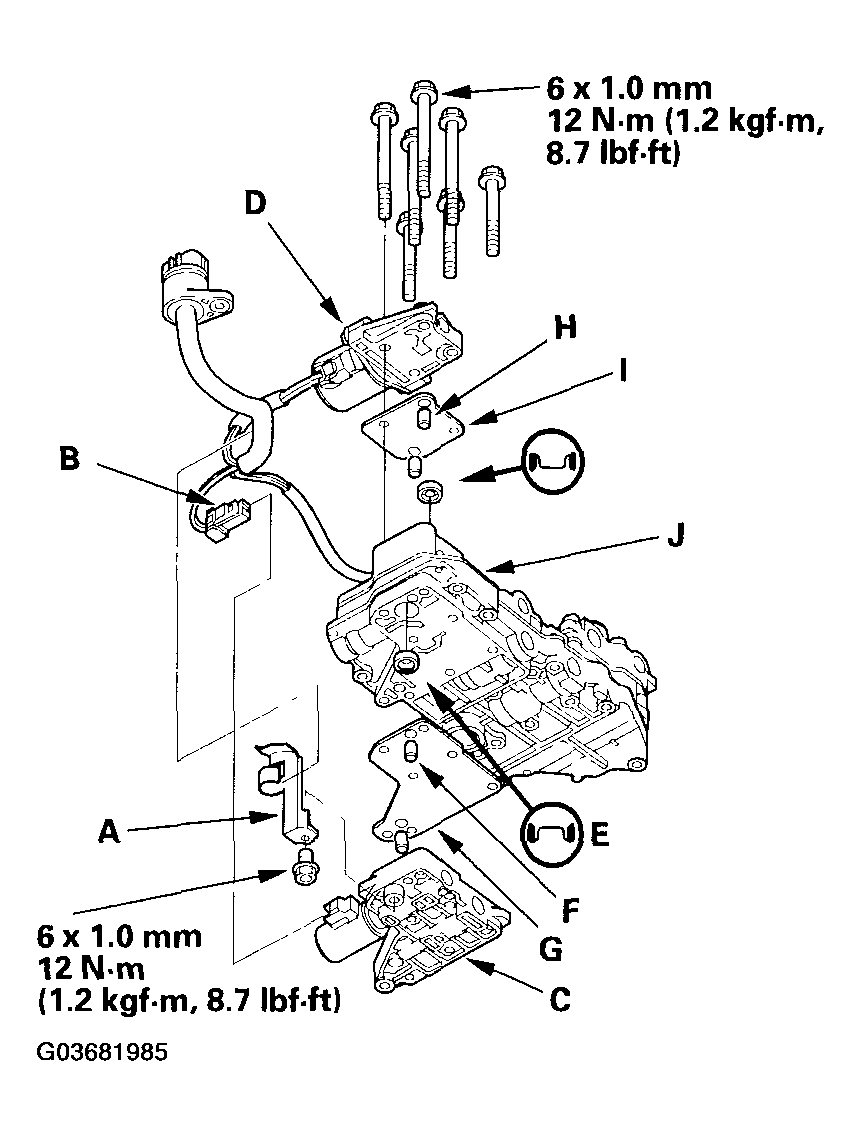
- Remove the solenoid harness clamp (A).
 Courtesy of AMERICAN HONDA MOTOR CO., INC.
- Disconnect the CVT drive pulley pressure control valve connector (B).
- Remove the seven bolts, and remove the CVT drive pulley pressure control valve (C). The CVT start clutch pressure control valve (D) also be removed, it uses those four bolts.
- Check that the filter (E) is in good condition, replace it if it is clogged or damaged.
- Install the new CVT drive pulley pressure control valve with the dowel pins (F) and separator plate (G), and CVT start clutch pressure control valve with the dowel pins (H) and separator plate (I) on the lower valve body (J).
- Connect the CVT drive pulley pressure control valve connector.
- Install the solenoid harness clamp.
- Install the lower valve body (see
LOWER VALVE BODY ASSEMBLY REPLACEMENT ).