Entering Diagnostics (Automatic Display Sequence)
- Turn ignition off. Using a jumper wire, connect Data Link Connector (DLC) connector terminal No. 12 (CCM diagnostic enable) to No. 4 (ground). See Fig 1
. Turn ignition on. CCM will display DTCs and module for which they apply in an automatic display sequence.
- First digit on trip monitor represents module number; CCM is module "1", PCM/ECM is module "4", ABS/TCS EBTCM is module "9" and DERM is module "A". During automatic display sequence, DTCs for each module are displayed. Each DTC is displayed for 3 seconds, followed by a one second pause before next DTC is displayed. There is a 3 second pause between display sequence for each module. End of automatic display sequence is displayed as "- - -" on speedometer.
- If a communications problem is present between PCM/ECM, EBTCM or DERM and CCM, speedometer will display "Err" when CCM is trying to communicate with the modules. Speedometer display will also indicate if a DTC is current or history. Current DTCs are displayed as "C" and history DTCs are displayed as "H" on speedometer display. All PCM/ECM and EBTCM DTCs will be displayed by CCM as history DTCs, whether DTCs are current or history.
- After all DTCs have been displayed for each module, trip monitor will display "1.0" and speedometer display will be blank, indicating CCM is in manual diagnostic mode waiting for input from technician. At any time during automatic display sequence, press any button on DIC to cancel automatic sequence and enter manual diagnostic mode. To exit diagnostics, turn ignition off and remove jumper wire. See ABS/TCS DIAGNOSTIC TROUBLE CODE (DTC)
table. To clear DTCs, see CLEARING DTCS. If no DTCs are present and a problem exists with ABS/TCS, see ABS/TCS SYMPTOM DIAGNOSIS
.
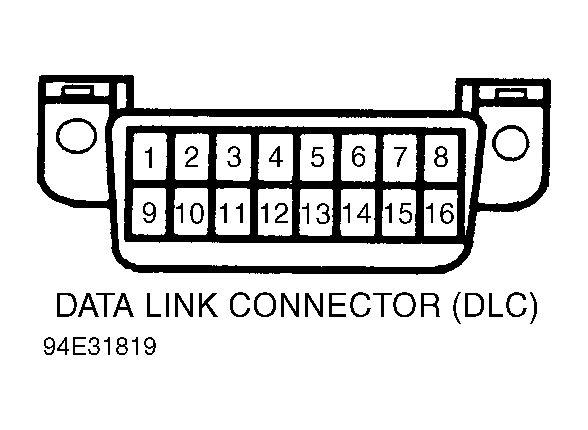 Courtesy of GENERAL MOTORS CORP.