Removal Procedure
 Courtesy of GENERAL MOTORS CORP.
- Remove the rear compartment trim. Refer to Compartment Trim Panel Replacement - Rear
in Body Rear End.
- Disconnect the electrical connector from the cellular telephone module.
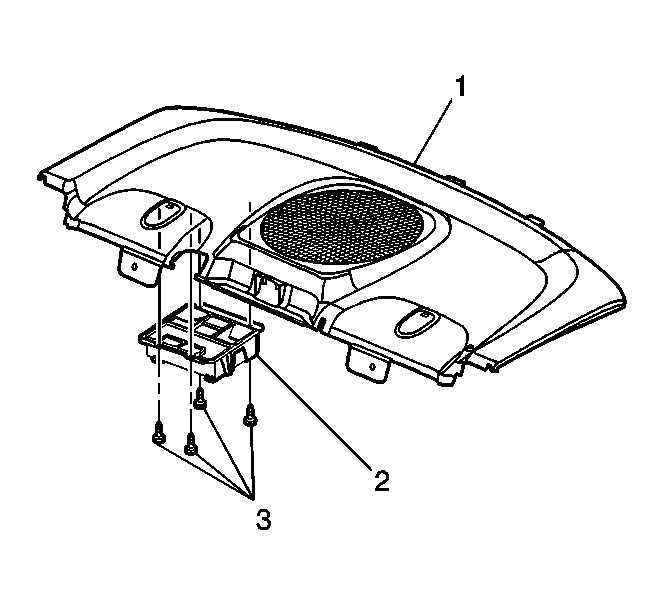
- Remove the four fasteners (3) retaining the cellular telephone module and bracket assembly (2) to the rear shelf trim panel (1).
- Remove the cellular telephone module and mounting bracket assembly (2) from the rear shelf trim panel.
 Courtesy of GENERAL MOTORS CORP.
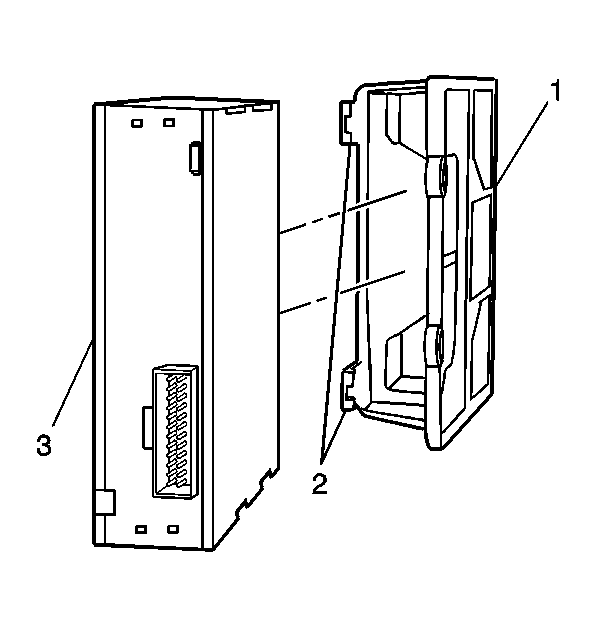
- Release the cellular telephone module mounting bracket retaining tabs (2) and slide the cellular telephone module (3) out of the mounting bracket (1).